

Another day another update from the guys at Skylum
This one is pretty good.
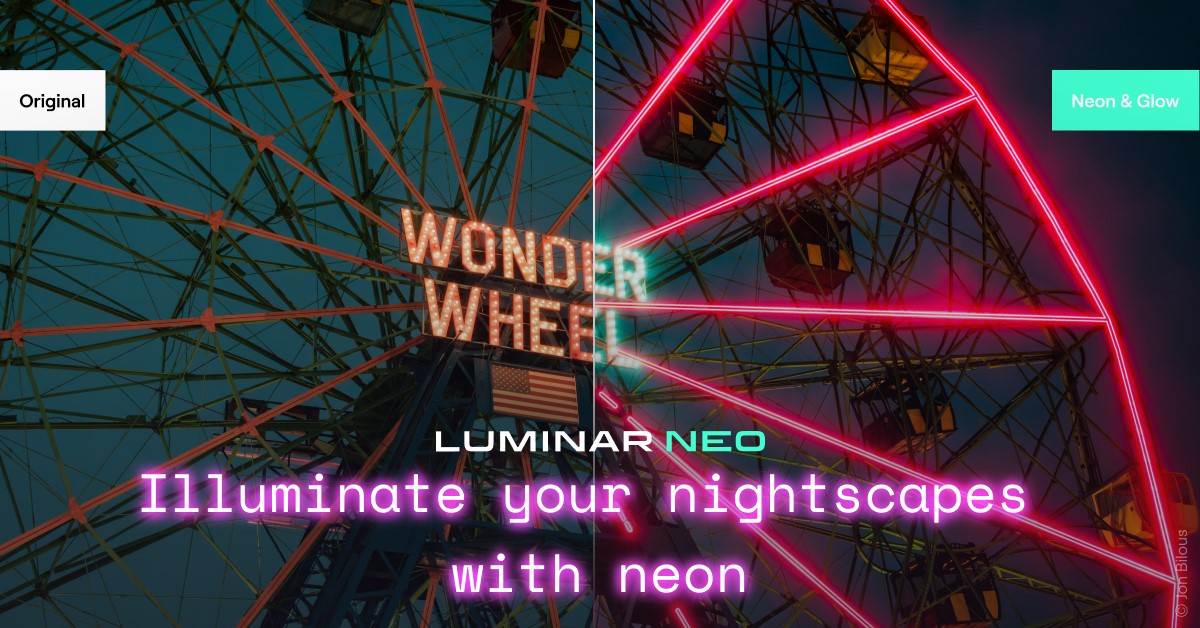
The first new addition is Neon and Glow
Discover even more creative possibilities for light manipulation. Seamlessly blend visually striking neon elements into your composition or make your subject glow. It’s perfect for adding that futuristic look to your images, creating captivating digital art, or delivering impressive wildlife photos with a twist. In addition, apply Neon & Glow on your nightscapes and turn them into true visual masterpieces.
Let’s take a look:
The second is Tilt Shift Blur
What is the tilt shift effect?
The tilt-shift lens has the capability of two different types of motion: the rotation of the lens plane relative to the image plane and the movement of the lens parallel to the image plane.
Tilt is used to control perspective and the field that is in focus, the part of the image that remains sharp. The shift is needed to change the position of image objects without having to move the camera backward, for example, it is very useful to avoid the convergence of parallel lines when shooting tall buildings.
You can get interesting effects for a photo by shifting and rotating the lenses. As a result, the there’s more opportunities to make unusual shots. The method of simulating depth of field in with tilt shift blur is called a fake tilt-shift effect because the photos used were not taken with a tilt shift lens.
Luminar Neo’s Tilt Shift blur option is the fourth type of effect in the Blur Tool. With it, you can transform life-sized locations or subjects to look like miniature-scale models. Experiment with your cityscapes, landscapes, and aerial photos. Just like with the other types of blur, you can adjust the amount, angle, and position of the effect, and use masking to selectively apply it.
Let’s see how that works in practice:
If this entices you to grab a copy or subscription of Luminar Neo then go here and get a 10% discount if you use the coupon code KATIN10.

 Katin Images Travel Photography
Leave a comment